LinkedIn gives you access to a huge pool of serious buyers, sellers, and investors.
But LinkedIn real estate lead generation is not about posting the same listing photos in one more place. It’s about using a professional, data-rich platform like a lead machine.
There are tens of millions of registered companies on this platform. That’s where decision-makers, business owners, and high-income professionals spend time every day.
You need to use LinkedIn in a targeted way.
When you know how to generate real estate leads from LinkedIn, you’re putting your brand in front of people who can actually buy or sell property.
In this article, we’ll go through all the steps on how to generate real estate leads on LinkedIn, including automating your data management using integrations such as:


Step-by-step: How to generate real estate leads on LinkedIn
Want to tap into the massive user base LinkedIn has to offer? Here’s how to specifically use it for lead generation.
Step 1: Turn your profile into a mini-landing page
Your profile is the first step in your LinkedIn real estate lead generation funnel.
It’s a sort of landing page that clearly shows what you do and speaks to the potential customer’s needs.
If you have not done so already, take care of these three things right away:
- Fix your headline: Update it with a clear niche and promise, in addition to your affiliation staying the classic Realtor at XYZ Realty line.
Here’s a great headline example:

- Banner image: Use it for branding or to show your market plus a simple call to action. Take a look at this example:

- About section: In a few short lines, state:
- Who you help
- Where you work
- What problems you solve (pricing, negotiating, relocation, investing)
- How to contact you (phone, email, calendar link)
Then add proof in your Featured section. This can be market reports, before-and-after pricing case studies, a 30–60 second video walkthrough, or screenshots of client reviews.
Also, any endorsements on your landing page are an added advantage.
Anyone who visits your profile should know in 10 seconds what you do, who you serve, and why they should trust you.
Step 2: Build targeted prospect lists and start genuine conversations
LinkedIn real estate lead generation lets you filter the entire platform by job title, company size, location, and industry.
And that’s a powerful tool because marketing to the right audience makes the whole campaign much more effective.
Use filters to find people who match your ideal client profile:
- Higher-end buyers? Search for founders, C-level roles, or well-paid professionals in your city.
- Relocation deals? Search HR, People Ops, or Talent roles at companies that often move staff.
Then, save these searches so LinkedIn alerts you when new matching people appear.
Sending short connection requests accompanied by a text that sounds personalized and human is a huge win. Something along these lines (and within the 300-character limit):
“Hi [name], I share short monthly updates on [city] prices and investment deals. Thought it might be useful to you. Happy to connect.”
After they accept, share one local stat or ask a simple timing question about their plans. Are you planning to buy, sell, or invest in [city] in the next 12 months?
Wondering how to find your target audience on LinkedIn? Here’s everything you need to know.
Step 3: Publish content that attracts local buyers and sellers
If your posts only get likes from other agents, your content angle needs to change.
But how to generate real estate leads on LinkedIn using a content strategy? To make LinkedIn real estate lead generation work, your content has to be for buyers, sellers, and investors in your market.
Use a simple weekly plan:
- Market clarity posts: “Here’s what changed in [neighborhood] prices this quarter and what it means if you plan to sell soon.”
- Deal story: Short breakdown of a real deal, offering the problem (overpriced home, multiple offers, tricky inspection), your strategy, and the result (days on market, price vs. list, saved money).
- How-to posts: “Three mistakes first-time investors make when buying small multifamily buildings in [city].”
You can use LinkedIn-native formats. They often have a strong first line of text (the hook matters more than the photo). LinkedIn bold text—achieved via Unicode generators (e.g., tools like YayText or LingoJam to create 𝗯𝗼𝗹𝗱 emphasis)—can make your hooks, key stats, or CTAs pop, improving scannability and engagement in crowded feeds without native formatting support.
Alternatively, they are carousels walking through a deal or a checklist step by step, or short phone videos explaining a trend or answering a common question.
Video is one of the fastest-growing formats on LinkedIn, with over 30% yearly growth. A 60-second clip explaining a deal or price change will often build more trust than ten generic listing posts.
Here’s an example:

No matter the format, end every post with a clear next step.
Your goal here is to create conversations you can track in an organic way.
Of course, using LinkedIn Ads can make things move a lot faster, but you still need a good organic base to make those ads perform well.
Also, you need to know what goes into the anatomy of a LinkedIn Ad.
Step 4: Use LinkedIn Lead Gen Forms
Now we move from organic content to paid LinkedIn real estate lead generation.
LinkedIn Lead Gen Forms let people submit their details without leaving the platform. The form auto-fills with their profile data, so they can raise their hand in a few taps.


This cuts friction and usually improves lead quality compared with a cold website form.
On their own, Lead Gen Forms are useful. Connected to your CRM, however, they turn into a high-performing lead management system.
As a LinkedIn Marketing Partner, LeadsBridge connects your forms with 380+ CRMs and marketing tools, so every new lead lands exactly where it should.
It also provides data bridges between other major ad platforms like Meta, Google, and TikTok with CRMs, email platforms, and sales tools.
Here’s how to add automated data management to your real estate funnel.


- On LinkedIn
In LinkedIn Campaign Manager, create a Lead Generation campaign targeting your ideal audience by job title, company, income level, and location.
Then, build a Lead Gen Form that asks:
- Are they buying or selling
- Timeline,
- Price range,
- Preferred neighborhood.
- On the LeadsBridge dashboard
You need an account (which you can create for free, if you haven’t already) to log into your dashboard.
Click here to sign up:

Once logged in, find the Create new Bridge button and click on it.
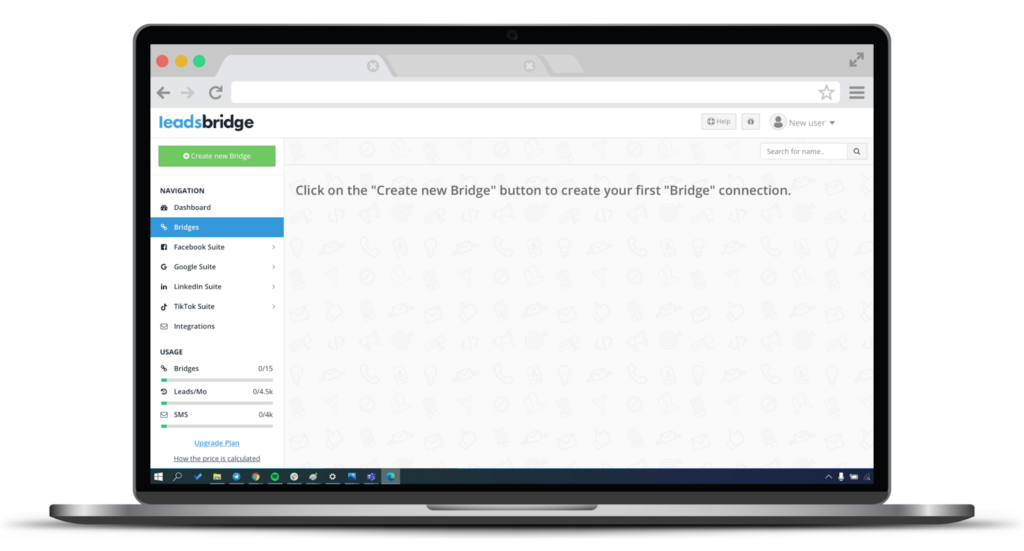
There, follow the simple instructions to set LinkedIn Lead Gen Forms as the source and your CRM (such as Salesforce®) or email platform as the destination.

Map each field (budget, city, timeline) to your CRM fields and activate real-time sync so each new lead appears instantly with the right tags in your system.
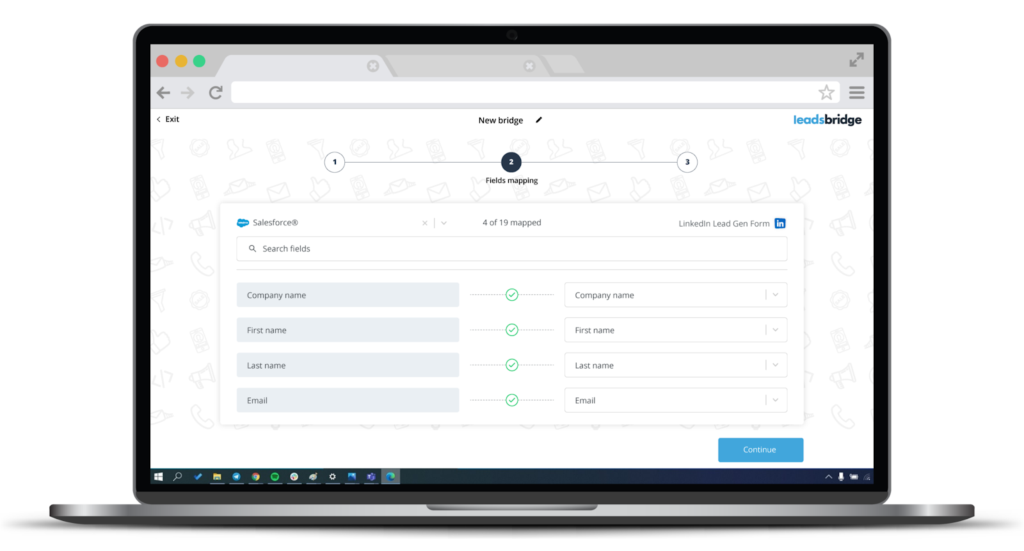
Run a test to check if everything is in order and click Save & Publish.
From there, your system can:
- Send an instant thank-you email with a calendar link.
- Notify the right agent on your team based on the city or the budget.
- Drop the lead into a nurture flow tailored to buyers, sellers, or investors.
LeadsBridge’s real-time lead sync is designed to kill that slow, error-prone process so you can act while intent is still high.
The best part is that this integration is available under LeadsBridge’s free tier.
For some inspiration, take a look at these outstanding LinkedIn lead generation examples.
Step 5: Retarget, nurture, and stay visible to your audience
LinkedIn is strong at staying in front of people who have already shown interest. Profile visitors, website visitors, video viewers, and people who filled out forms or attended events.
But most people are not ready to list or buy the first time they see you.
Set things up so none of that attention is wasted:
- Install the LinkedIn Insight Tag on your website to build Matched Audiences based on visits and actions. Here’s how to set it up.
- Use Matched Audiences integrations to connect your CRM segments with LinkedIn so your warm lists stay updated in your ad account.


- Run retargeting campaigns that speak only to those warm audiences.
You can also use LinkedIn Events for short webinars.


Use your LinkedIn Events and leads-to-CRM workflows to sync event registrants into your CRM. That keeps you top of mind without you chasing every single person manually.
Also, make sure to send your conversion data back to LinkedIn, so your campaigns get better over time.

What to take away from this?
You don’t need a full-time marketing department to generate real estate leads on LinkedIn. All you need is to have structure and to stay consistent. Also, the tools you use make a difference.
If you’re serious about using LinkedIn to generate real estate leads at scale, you need tools that are built for advertisers.
LeadsBridge automates your customer acquisition by syncing lead data to and from LinkedIn, while creating an interconnected data stack: the best shape a marketing stack can be in.